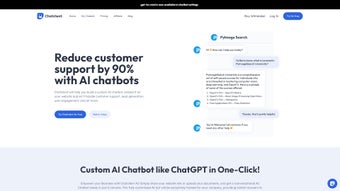

Download ChatClient – anpassbarer KI-Chatbot für Kundensupport
Overview
ChatClient ist ein webbasierter KI‑Chatbot‑Builder, der Unternehmen befähigt, personalisierte, datengetriebene virtuelle Assistenten für den Kundensupport zu erstellen. Durch das Einlesen unternehmensspezifischer Informationen – wie Website‑URLs, PDFs, CSV‑Dateien und andere Dokumentformate – trainiert die Plattform einen Chatbot, der Fragen beantworten, Nutzer durch Prozesse führen und Probleme rund um die Uhr lösen kann. Die intuitive Benutzeroberfläche ermöglicht es, Daten hochzuladen und den Trainingsprozess mit einem einzigen Klick zu starten, wodurch komplexes Coding oder Fachwissen im Bereich Machine Learning entfällt. Nach dem Training kann der Chatbot als responsives Widget auf jeder Website eingebettet werden und sofortige, kontextbezogene Antworten liefern, die Engagement und Konversionsraten steigern.
Obwohl sich ChatClient derzeit nur auf englischsprachige Interaktionen konzentriert und keine öffentliche API bereitstellt, machen das vereinfachte Setup, das sichere Cloud‑Hosting und der kontinuierliche Verbesserungszyklus es zu einer wertvollen Ergänzung jedes Kundenservice‑Arsenals. Unternehmen, die ChatClient eingeführt haben, berichten von höheren Zufriedenheitswerten, reduziertem Ticketvolumen und einem messbaren Umsatzanstieg dank schnellerer Reaktionszeiten. Egal, ob Sie einen kleinen E‑Commerce‑Shop oder einen mittelgroßen SaaS‑Anbieter betreiben, bietet ChatClient eine kosteneffiziente Möglichkeit, den Support zu automatisieren und gleichzeitig die Markenstimme und Wissensbasis zu bewahren. Die Plattform enthält zudem integrierte Analysen, die Ihnen helfen, wichtige Leistungskennzahlen wie durchschnittliche Reaktionszeit, Nutzerzufriedenheit und Konversionsauswirkung zu verfolgen, sodass Sie die Daten haben, um sowohl den Bot als auch Ihre gesamte Support‑Strategie fein abzustimmen.
Sicherheit hat oberste Priorität; alle Daten werden sowohl während der Übertragung (TLS 1.2) als auch im Ruhezustand (AES‑256) verschlüsselt, und der Service entspricht GDPR, CCPA und anderen wichtigen Datenschutz‑Vorschriften. Regelmäßige automatisierte Updates stellen sicher, dass Sie stets von den neuesten KI‑Verbesserungen profitieren, ohne manuelle Patches. Für Unternehmen, die ihre Support‑Operationen zukunftssicher machen wollen, beinhaltet die Roadmap von ChatClient Mehrsprachen‑Funktionen und API‑Erweiterungen, wodurch es zu einer vorausschauenden Investition wird, die mit den Bedürfnissen Ihrer Organisation mitwachsen kann.
Key Features & Capabilities
- Ein‑Klick‑Training: PDFs, CSVs hochladen oder auf Webseiten verlinken und den KI‑Trainingsprozess sofort starten.
- Website‑Widget‑Integration: Das Widget nahtlos auf jeder Seite einbetten mittels kurzem Skript oder Plug‑In.
- Kontextbasierte Wissensdatenbank: Der Bot zieht Antworten direkt aus den hochgeladenen Unternehmensdaten und gewährleistet Relevanz.
- Anpassbare Gesprächsabläufe: Drag‑and‑Drop‑Builder ermöglichen das Definieren von Begrüßungen, Fallback‑Nachrichten und Eskalationspfaden.
- Analyse‑Dashboard: Echtzeit‑Metriken zu Nutzerinteraktionen, Zufriedenheitswerten und Konversionsauswirkungen.
- Sicheres Cloud‑Hosting: Alle Daten werden im Ruhezustand und während der Übertragung verschlüsselt, konform mit GDPR‑ und CCPA‑Standards.
- Multi‑Channel‑Support (Zukünftige Roadmap): Geplante Erweiterungen für Facebook Messenger, WhatsApp und Live‑Chat‑Übergabe.
Beyond the headline features, ChatClient excels at reducing the friction that typically accompanies AI adoption. The platform automatically extracts key entities from documents, builds a searchable index, and continuously refines its response accuracy through supervised learning. Users can fine‑tune the bot’s tone—formal, friendly, or technical—to match brand guidelines. Additionally, the built‑in escalation system routes complex queries to human agents, preserving a seamless handoff experience. For teams that rely on data‑driven decisions, the analytics suite provides insights into peak usage times, most‑asked questions, and drop‑off points, enabling iterative improvements without external consultants.
Each feature is designed with scalability in mind. The one‑click training engine leverages cloud‑based GPU resources, allowing you to train larger knowledge bases without local hardware constraints. The widget is fully responsive, adapting to desktop, tablet, and mobile screen sizes, and it supports lazy loading to minimize page‑load impact. Security controls include role‑based access, two‑factor authentication, and audit logs that record every change to the bot’s configuration. While the current version lacks multi‑language support, the underlying architecture is modular, making the addition of language packs straightforward for future releases.
Finally, ChatClient’s roadmap reflects a commitment to expanding functionality. Upcoming releases will introduce a public API, enabling developers to integrate the bot with CRM systems, ticketing platforms, and custom dashboards. Multi‑language processing, sentiment analysis, and voice‑assistant compatibility are also on the horizon, ensuring that the solution remains competitive as conversational AI standards evolve.
Installation & Usage Guide
Schritt‑für‑Schritt‑Einrichtung
- Ein Konto erstellen: Besuchen Sie die ChatClient-Startseite, klicken Sie auf „Registrieren“ und schließen Sie die Verifizierungs‑E‑Mail ab.
- Laden Sie Ihre Wissensbasis hoch: Navigieren Sie zum Tab „Data Sources“ und ziehen Sie PDFs, CSVs hinein oder fügen Sie URLs ein. Das System wird den Inhalt automatisch parsen und indexieren.
- Training starten: Nach Abschluss des Uploads klicken Sie auf die Schaltfläche „Train Bot“. Die KI‑Engine läuft 5‑10 Minuten, abhängig von der Datenmenge.
- Chat‑Widget gestalten: Verwenden Sie den visuellen Flow‑Editor, um Begrüßungsnachrichten, Schnellantwort‑Buttons und Fallback‑Logik festzulegen. Vorschau des Gesprächs in Echtzeit.
- Auf Ihrer Seite einbetten: Kopieren Sie das generierte JavaScript‑Snippet und fügen Sie es vor dem schließenden
-Tag Ihrer Website ein, oder nutzen Sie das WordPress‑Plug‑In für automatische Einfügung. - Überwachen & Optimieren: Öffnen Sie das „Analytics“-Dashboard, um Interaktionsmetriken zu prüfen. Passen Sie die Wissensbasis oder den Gesprächsablauf nach Bedarf an.
The entire process is designed for non‑technical users. During training, ChatClient provides progress indicators and alerts if any uploaded file cannot be parsed, offering suggestions for format correction. Once live, the widget adapts to device screen sizes, ensuring a consistent experience on desktops, tablets, and smartphones. For businesses that require a quick proof of concept, the free tier allows up to three data sources and 1,000 monthly interactions, making it easy to test ROI before scaling to the paid plans.
Beyond the basic setup, the platform includes several best‑practice recommendations. Regularly review the “Knowledge Base Health” report to identify outdated documents or low‑confidence responses. Use the “Training Refresh” button to re‑train the model whenever you add significant new content, ensuring the bot stays up‑to‑date. If you encounter parsing errors, the built‑in “File Fixer” tool can automatically convert scanned PDFs into searchable text using OCR technology.
Updates are delivered automatically through the cloud infrastructure, meaning you never have to download patches or manage servers. The system also supports webhooks for real‑time notifications, such as when a conversation is escalated to a human agent. For larger teams, you can assign role‑based permissions (admin, editor, viewer) to control who can modify the bot’s configuration, enhancing governance and compliance. Finally, the built‑in “Export” feature lets you back up your entire bot configuration and knowledge base, providing a safety net in case of accidental changes.
Compatibility, Pros & Cons
Unterstützte Plattformen
ChatClient ist eine cloud‑native SaaS‑Lösung, das bedeutet, sie läuft in jedem modernen Web‑Browser — Chrome, Firefox, Edge oder Safari — auf Windows, macOS, Linux, Android und iOS‑Geräten. Da das Chatbot‑Widget als JavaScript gerendert wird, lässt es sich mühelos in statische HTML‑Seiten, CMS‑Plattformen wie WordPress, Joomla und Drupal sowie E‑Commerce‑Lösungen wie Shopify und Magento integrieren. Es sind keine zusätzlichen Softwareinstallationen auf der Kundenseite erforderlich, und die Admin‑Konsole ist für Desktop‑ und Mobil‑Browser optimiert, sodass Support‑Teams den Bot unterwegs verwalten können.
Pros
- Rapid deployment with one‑click training.
- Intuitive drag‑and‑drop flow editor.
- Secure, GDPR‑compliant data handling.
- Comprehensive analytics for continuous improvement.
- Free tier for small businesses and testing.
- Responsive widget that works on all devices.
- Role‑based access and two‑factor authentication for admin security.
Cons
- No native multi‑language support yet.
- Absence of a public API limits third‑party integrations.
- Advanced customization (e.g., custom NLP models) requires higher‑tier plans.
- Free tier imposes limits on data source count and interaction volume.
- Currently no built‑in voice‑assistant compatibility.
Overall, the strengths of ChatClient—speed, ease of use, and data‑centric AI—outweigh its current limitations. Companies that operate primarily in English and need a reliable, secure chatbot can adopt the platform immediately, while those with multilingual requirements can keep an eye on the upcoming roadmap. The lack of an open API may be a deal‑breaker for enterprises seeking deep integration, but for most SMBs the built‑in widget and dashboard provide sufficient flexibility. The responsive design and cross‑browser compatibility ensure that end‑users enjoy a consistent experience regardless of device, while administrators benefit from a cloud‑only architecture that reduces IT overhead.
Frequently Asked Questions
How does ChatClient train the chatbot with my documents?
After you upload PDFs, CSVs, or provide URLs, ChatClient extracts text, identifies key entities, and builds a searchable knowledge base. The training engine then creates intent‑response pairs based on the content, which can be refined manually if needed.
Is there a limit to the number of files I can upload?
The free plan allows up to three data sources (total size 50 MB). Paid tiers increase the limit to 50 files and 5 GB of total storage, which is sufficient for most medium‑size businesses.
Can I customize the chatbot’s tone and personality?
Yes. The conversation flow editor includes a “Style” panel where you can select formal, friendly, or technical tones, and you can also add custom greetings, emojis, and response templates.
What security measures does ChatClient provide?
All data is encrypted in transit (TLS 1.2) and at rest (AES‑256). The platform complies with GDPR and CCPA, and you can enable two‑factor authentication for admin accounts.
Do I need any coding skills to embed the chatbot?
No. The generated JavaScript snippet can be pasted into any HTML page, and for popular CMS platforms there are ready‑made plugins that handle the insertion automatically.
Conclusion & Call to Action
ChatClient stands out as a fast, secure, and highly customizable AI chatbot builder that removes the technical barriers traditionally associated with conversational AI. By leveraging your own documents, the platform delivers answers that are accurate, on‑brand, and available 24/7, helping you reduce support costs and increase customer satisfaction. While the current lack of multi‑language support and an open API may limit some enterprise scenarios, the roadmap promises expansions that will keep the solution competitive.
For businesses looking to modernize their help desks without investing in large development teams, ChatClient offers a compelling balance of ease‑of‑use, robust analytics, and scalable pricing. The free tier provides a risk‑free way to evaluate ROI, and the paid plans add generous limits, priority support, and upcoming features such as multi‑channel integration.
Ready to experience instant, AI‑powered support on your website? Download ChatClient now, start the free trial, and see how a personalized chatbot can transform your customer interactions today.
Pros: Quick deployment, intuitive UI, strong security, actionable analytics, responsive widget.
Cons: No multi‑language, no public API, limited free tier.



.png)



